Showing posts with label Google. Show all posts

Saturday, November 15, 2025

Why I Finally Ditched Firefox After Years of Loyalty

Changing Web Browsers from Firefox to Chrome and My Journey
Have you ever realized how easy it is to fall into a tech rut? We stick with what’s familiar, whether it’s the same brand of cereal or the same make of car. For me, that rut has been Mozilla Firefox. I’ve used it for what feels like forever. Honestly, I can’t even remember when I started, but it has been my go-to browser across Windows, Mac, and my phone. Back then, Firefox felt fast, feature rich, and easy to use. Plus, it offered something I really wanted: the ability to sync bookmarks between my iPhone and Windows. That was a game changer at the time. Of course, now every modern browser does that, syncing bookmarks, autofill, and passwords so you can pick up where you left off on any device.

But last week, things changed. Firefox started driving me crazy. Pages were slow, the spinning wheel was constant, and overall performance just wasn’t great. This wasn’t just on one computer, it was happening on both my work and home machines. So, I decided to do something radical for me: give Google Chrome a full day test drive.

At first, I only installed Chrome on my work computer. Sure, I’ve used Chrome, Edge, Safari, and others over the years, but never as my primary browser for an entire day. This time, I committed. And wow, within the first hour, the difference was obvious. Pages loaded faster. Everything felt snappier. Out of curiosity, I tried Safari for an hour too. It was also faster than Firefox, but Chrome still felt like the winner. Then I gave Microsoft Edge a quick spin and again, super fast. No surprise there, Edge and Chrome share the same Chromium engine.

Here’s the thing: I’ve always had multiple browsers installed for testing, but I never thought about switching permanently. After this experience though, I officially moved to Chrome on all my devices. There’s a small learning curve, figuring out where settings live and getting used to tab behavior, but overall, I’m impressed. Websites load noticeably faster, and the whole experience feels smoother.

Thinking back, it’s funny how far browsers have come. I remember using Netscape Navigator way back in the day. Mosaic too, in the early 1990s. Netscape launched in 1994, and I stuck with it for years. Then came Internet Explorer. I used IE for a long time, mostly because some sites wouldn’t work on anything else. Eventually, I switched to Firefox, and now here I am, making the leap to Chrome. Will I stay here forever? Probably not. Tech moves fast, and I like to keep an open mind.

So, what about you? What browser do you use and why? Do you stick with one across all your devices or mix and match?

This might not be the most thrilling topic, but it’s part of my tech journey, and I wanted to share it. Until next time, have a great Sunday and an amazing week ahead!

Sunday, May 25, 2025

This Google Tool Turned My Blog Into a Podcast—Here’s What Happened

Oliver in Back Yard While I was Away

 It’s been a busy week for me with a conference I attended in Pittsburg, KS. I worked on Monday, then drove to Pittsburg on Tuesday. I was there from Tuesday through Thursday with a packed schedule full of meetings and presentations. Everything went really well! By Wednesday night, I was so tired after a full day of meetings that I just lounged in my hotel room watching shows—and I was asleep by 10:30.

While I was away, Carrie sent me a few pictures of Oliver enjoying the backyard. The image to the right shows him soaking up the sun while lounging in the yard. She also sent a picture of him chasing a rabbit—oh, the joys of being a dog!

This was my second conference in just a few short months. At both events, I heard about a site called NoteBookLM from Google. I first came across it at eLive back in April but hadn’t had much time to explore it. After hearing about it again at this conference, I decided to give it a try.

If you haven’t checked out NoteBookLM, I highly recommend it. You can upload a technical manual, notes, or other information, and the site can turn it into a podcast, a FAQ, or even allow you to chat live with an AI about the content. I tested it using my own website (https://blogger.haverty.net/) to see what it would do with my blog content. It turned my site into a podcast summarizing the past few months of posts. You can listen to the podcast generated by NoteBookLM below.


It did a great job scanning my site and summarizing what I post about each week. The audio file above was generated by NoteBookLM as if two (fictional) hosts were doing a podcast about my blog. I thought it was really cool and wanted to share it—not just because it was fun, but because it’s amazing how NoteBookLM uses AI to turn content into something so accessible and engaging.

Until next time, have a great week!

Sunday, May 30, 2021

Request for ad-free with Background Play for YouTube TV Included in Cost

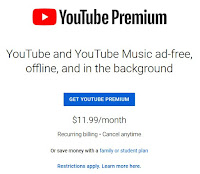
Screen Shot Taken from YouTube Premium Web Site

We use YouTube TV for our TV viewing. Both Carrie and I frequent regular YouTube for watching videos. Recently, I signed up for a trial of YouTube Premium. I had a 30 day trial of the premium service which simply means that I had ad-free viewing, background play, downloads, and YouTube Music Premium.

For me, I did the 30 day trial because we are YouTube TV customers and have been happy with the service. We have had the service for over a year at this point and enjoy the endless recordings. The features included in the YouTube Premium of ad-free viewing, background play, downloads, and music really did not do a lot for me for the four options. I did trial as I wanted to see if I could have TV streaming in the background or picture-in-picture feature on iOS. Nope! This is not possible!

I do not understand why these additional features of Premium are not included in YouTube TV. I did not realize until I was researching this that YouTube Music Premium is normally $9.99 a month, but if you subscribe through YouTube Premium, not only do you get music, but also the ad-free viewing, background play, and downloads. It seems that with those of us being YouTube TV customers, we should already be considered Premium and get the extras included in our subscription. 

This is nothing new and I recall seeing people post on Reddit, Twitter, etc., about this in the past. I simply make the case again that for those of us already subscribing to TV through Google, we should have the premium options available to us without requiring us to subscribe to those extra services.

I have since canceled my trial of YouTube Premium simply because the benefit of the extra features was not enough to continue paying $11.99 a month. I can live with the ads but it was nice to be able to play in the background. A much needed addition to YouTube TV is to be able to play in the background or the ability to play picture-in-picture on iOS as many other streaming services have allowed.


Saturday, March 20, 2010

March Madness and Other Discussions....

I love this time of year! It is one of my favorite times of year since probably grade school. I remember writing papers during Spring Break in junior high and high school with basketball games playing. What a start to the NCAA tourney! K-State and Kansas both play tonight and it should be a lot of fun!

This year I took off Thursday and Friday to watch basketball. It was worth it! My sister, Dina, takes off two whole weeks during this time of year. I would love to do so, but I can probably only afford to be off work for the two or so days; I will probably plan on doing the same thing next year because this was great!

I was able to watch three games at once and then follow the score of the forth game in real-time via ESPN Insider. It was awesome! There is a lot more work to do for the Kansas Jayhawks! They started out flat in the game Thursday night and then woke up in the second half. They cannot afford to do that again if they want to win the national championship.

Well, it has once again been a while since I posted anything. Geez, I was going to try and do so much better. This is not one of the things that jumps in my head each time I sit down on the computer. Well, a post every two to three months will work for me.

I know I need to redo the forums here on Haverty.NET as they stopped working after my hosting company made some changes. Again, not a priority, so I have not gotten back to correcting the problem or adding a new forum.

If you have not tried Google Reader, do so now! It is available at http://reader.google.com and it is awesome! It is a RSS (or feed) reader, but it can also track standard web pages for changes. It definitely makes checking my feeds a lot easier and I can also access the feeds via my Blackberry. Check it out!

Well, we are getting ready to go do some grocery shopping, so I better sign off. It is a winter wonder land outside today after we got a blanket of snow. More is on the way.... This is the first day of Spring and we got about six inches of snow. More is on the way, but hopefully not a lot.

Have a great weekend and I will to you the next time!